
Math - 3D Rendering Engine, with Camera Projection
This simulation renders a 3D cube onto the screen by applying the Perspective Projection transformation to each of the vertices of the polygon in question. It calculates the normals and uses them to perform back face culling. The cube can be moved with WASD and Shift or Space to go up and down. The Field of View (FOV) can be changed by scrolling.
Download
Download (Source code): Engine3D.zip
Download (Exe demo): Engine3D-Exe.zip
Github respository
https://github.com/mrgyularabai/Engine3DScreenshot
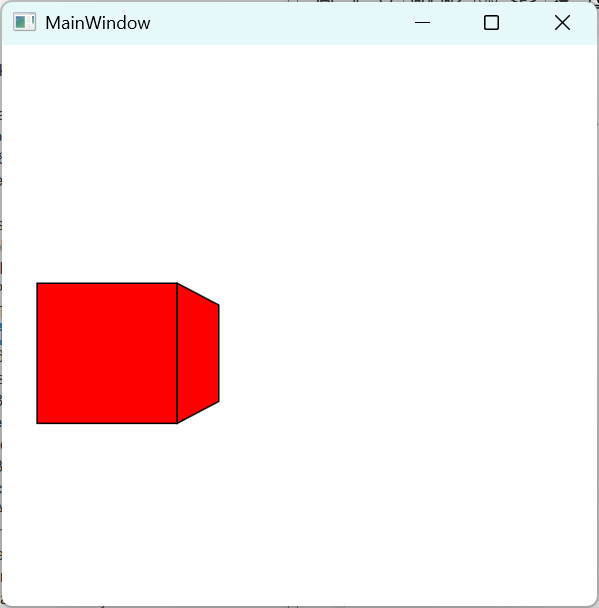
Overview
Engine3D is a lightweight 3D rendering engine built with C# and WPF, featuring a custom linear algebra library. The engine supports basic 3D mesh rendering with perspective projection, backface culling, and real-time interaction.
Key Features
- Custom linear algebra library with vectors, points, and matrices
- Perspective projection with adjustable field of view
- Backface culling for efficient rendering
- Real-time mesh manipulation and camera controls
- WPF-based rendering pipeline
Controls
The example app uses the following controls:
Keyboard Controls
| Key | Action |
|---|---|
| W | Move cube forward (increase Z) |
| S | Move cube backward (decrease Z) |
| A | Move cube left (decrease X) |
| D | Move cube right (increase X) |
| Space | Move cube up (increase Y) |
| Left Shift | Move cube down (decrease Y) |
| R | Reset cube to initial position |
Mouse Controls
| Control | Action |
|---|---|
| Mouse Wheel | Adjust field of view (zoom in/out) |
Understanding the code
Creating a Cube Mesh
OzPloygon3D[] cubeSides = new OzPloygon3D[6]
{
    // South face
    new OzPloygon3D(new OzPoint3D[4] {
        new OzPoint3D(-0.1M, -0.1M, 0),
        new OzPoint3D(-0.1M, 0.1M, 0),
        new OzPoint3D(0.1M, 0.1M, 0),
        new OzPoint3D(0.1M, -0.1M, 0)
    }, new OzVector3D(0, 0, -0.1M), height, width, zoom, camera),

    // Additional faces...
};

OzMesh cube = new OzMesh(cubeSides, new OzVector3D(0, 0, 1M));
Perspective Projection
// Project 3D point to 2D screen coordinates
OzPoint3D point3D = new OzPoint3D(x, y, z);
OzPoint2D screenPoint = point3D.Projection2D(
    height: canvasHeight,
    width: canvasWidth,
    zoom: fieldOfView,
    Znear: 0.01M
);
Vector Operations
// Create vectors
OzVector3D v1 = new OzVector3D(1, 0, 0);
OzVector3D v2 = new OzVector3D(0, 1, 0);

// Cross product (normal)
OzVector3D normal = v1.GetNormal(v2);

// Dot product
decimal dot = v1.DotProduct(v2);

// Normalize
v1.Normalise();

// Scalar operations
OzVector3D scaled = v1 * 2.5M;
OzVector3D sum = v1 + v2;
Rendering Loop
void render(object o, EventArgs e)
{
    if (cube.Init(width, height, zoom, camera))
    {
        Paper.Children.Clear();
        for (int x = 0; x < cube._polygons.Length; x++)
        {
            Paper.Children.Add(
                cube._polygons[x]._gfxPolygon._gfxPolygon
            );
        }
    }
}

// Attach to WPF rendering
CompositionTarget.Rendering += render;
Projection Mathematics
The engine uses perspective projection with the following formula:
fieldOfView = tan(zoom / 2) / Z * 1.83
aspectRatio = width / height

screenX = (X * fieldOfView / aspectRatio + 1) * (width / 2)
screenY = (Y * fieldOfView + 1) * (height / 2)>